Sellphy.
Sellphy is a shop platform I designed and built. A seller enters their company details, adds their products, walks through six steps, and has a working shop with checkout, legal pages and a domain. There is no agency in the middle and nothing to install. Shops go live about 70% faster than on comparable platforms, and serving them from a small VPS cut my hosting bill by 83%.

Demo shop. Select to enlarge.
- 70%
- faster to a live shop. Six guided steps instead of a theme marketplace and a plugin hunt.
- 90%
- less time on legal boilerplate. Privacy, terms and returns pages are generated for each shop.
- 75%
- higher on Google. AI-drafted custom pages, checked in Page Preview before they go out.
- 83%
- lower hosting cost. Public pages are built once and served as files from a small VPS.
A shop in six steps.
Company details and products go in first. Then the site editor walks the seller through layout, homepage, shop page, navigation, colors and fonts, and that is the whole setup. There is no theme to buy and no plugin to find, which is why a shop on Sellphy goes live about 70% faster than on comparable platforms.
Most of the work is in the homepage step: each section has a handful of variants, including a video hero. The preview in the middle is rendered with the same components as the live shop, so the page a seller approves is the page the customer gets. You can click a heading in the preview and type straight into it instead of finding the matching field in the side panel. A product grid in the editor is the grid the customer will see.
When the six steps are done the shop is live on a sellphy.store subdomain, with its privacy policy, terms and returns pages already in place. Those are generated per shop and follow the shop's details, so nobody is pasting boilerplate from a template site. I put the time that saves on legal pages at about 90%. Connecting a custom domain is a dashboard setting.
- LayoutWidth, corners, spacing
- HomeSections and their variants
- ShopThe catalog page
- NavigationMenu and footer
- ColorsA preset or your own
- FontsHeading and body pair
One product page,
three shops.
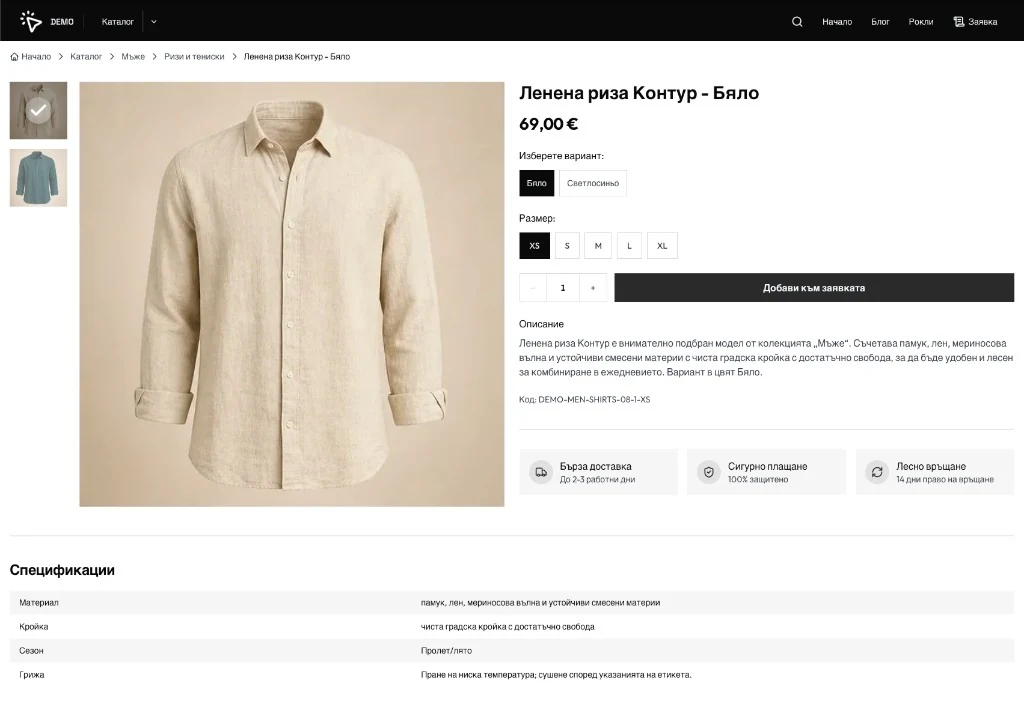
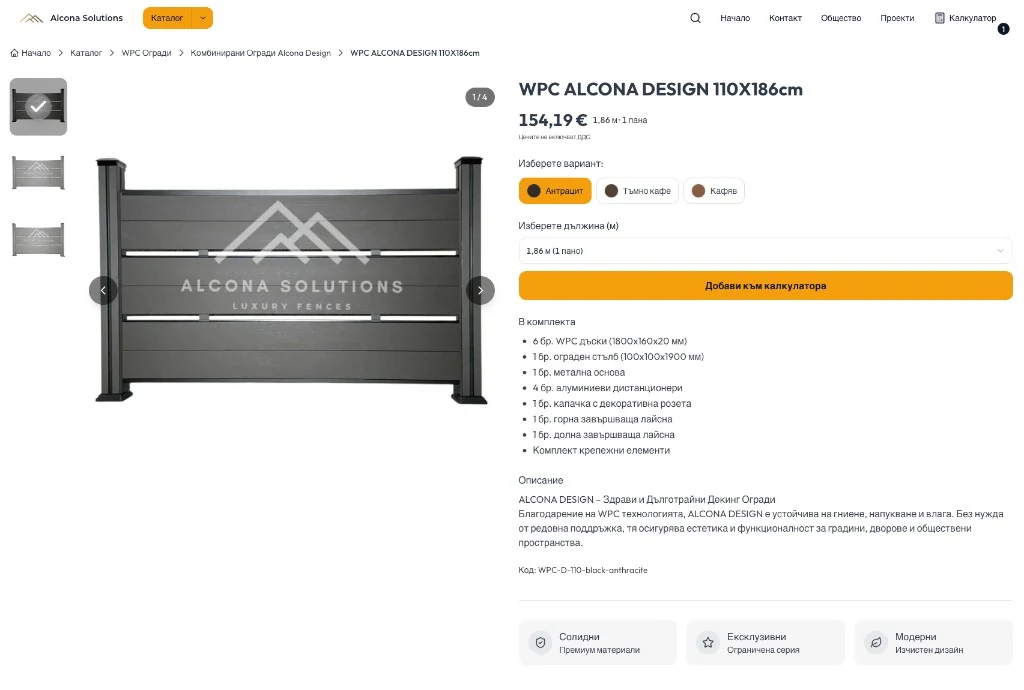
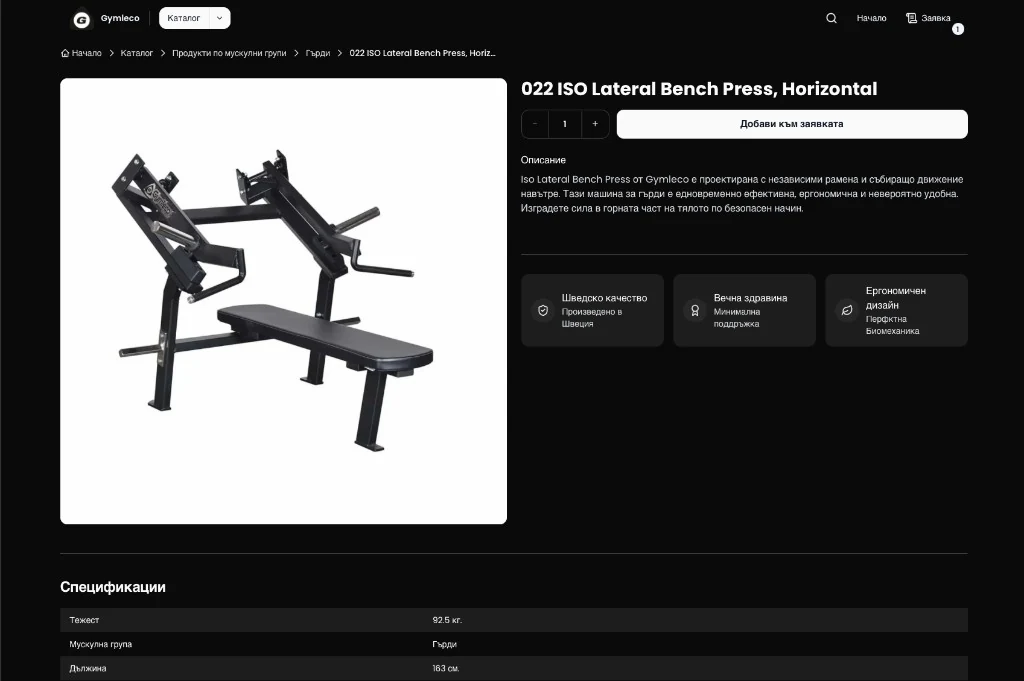
Every shop on Sellphy uses the same product page. What differs is settings: theme, gallery, trust cards, whether the quantity field shows, and what the button says. Variants can be size pills, color swatches or a dropdown, depending on what the shop sells.
DEMO sells clothes, so the variants are sizes and colors and the button says add to request. Alcona sells fence panels, so the variant is a length dropdown and the button says add to calculator. Gymleco sells gym equipment on a dark theme with feature cards and a specs table.
I wrote the page once. Each shop dresses it from the dashboard, so a seller changes how the page sells without touching code, and a fix I make lands in every shop the same day.
Where sellers spend the day.
Products, orders, inventory, promo codes, analytics, custom pages, the blog, the site editor, SEO tools and domains all live in one dashboard. It is in Bulgarian, because that is the language the sellers work in, and it assumes no training, because most sellers arrive with none.
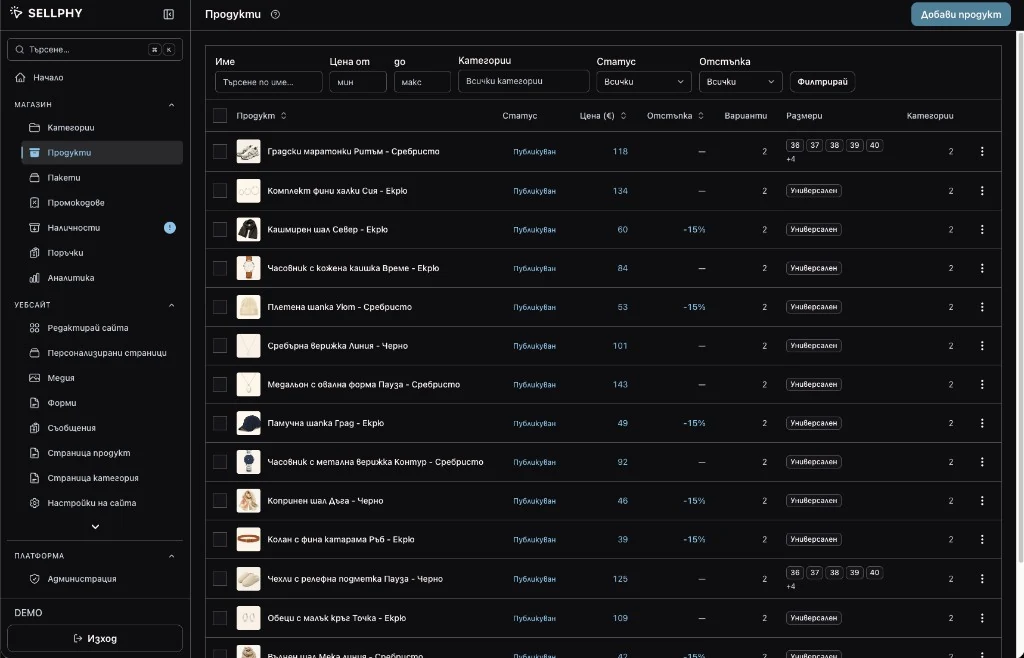
The products screen is a table: thumbnail, status, price, discount, variant count, sizes and categories, with filters across the top. Ticking rows opens bulk edit, so repricing forty shirts before a sale is one form, not forty.
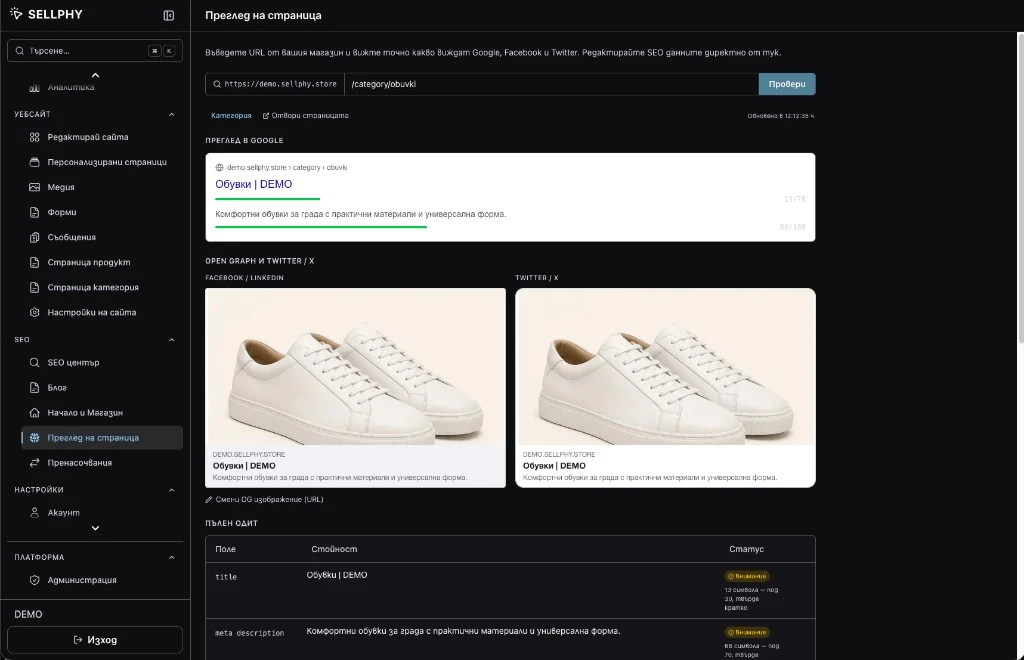
Page Preview takes any URL from the shop and shows what Google, Facebook and X will display for it, with character counts on the title and description. A title under 30 characters gets a warning. The audit table underneath lists every field it checked. Sellers fix the snippet before a page goes out instead of finding out weeks later in Search Console.
The AI drafts,
the seller decides.
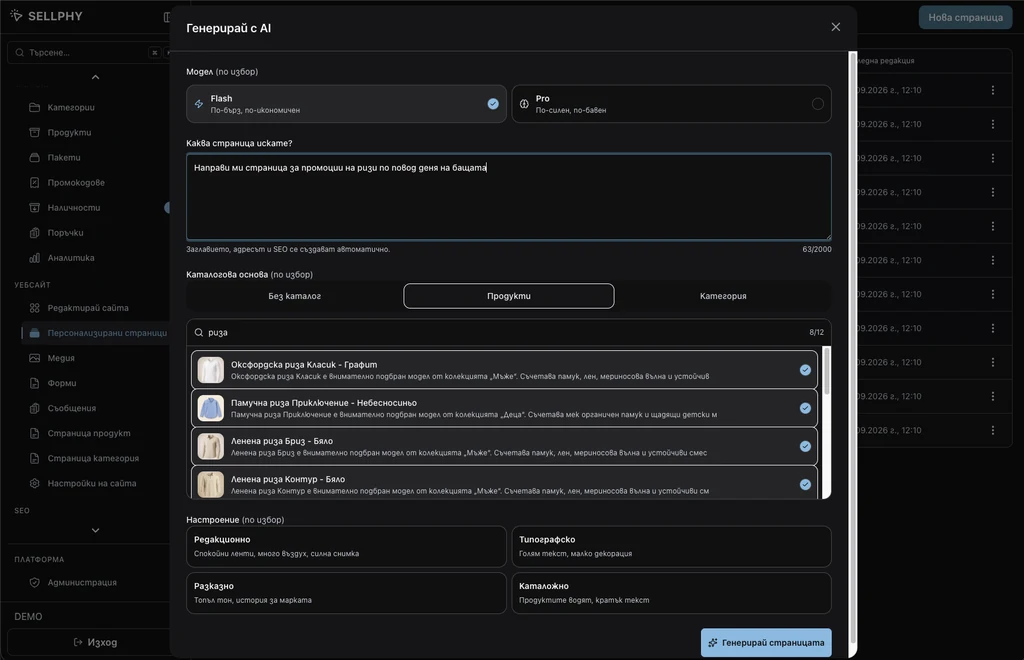
A seller who wants a Father's Day shirt promotion types that one sentence into the custom pages screen, picks Flash or Pro, ticks the shirts it should feature, chooses a mood, and gets a finished landing page with its title, URL and SEO metadata already filled in. Building that page by hand used to be an afternoon.
The catalog basis is what keeps the page honest. Anchored to eight selected products or a category, the AI writes about things the shop sells, at the prices in the database. The mood presets, editorial, typographic, narrative or catalog, pick the layout family, so the result lands inside the shop's design system rather than beside it.
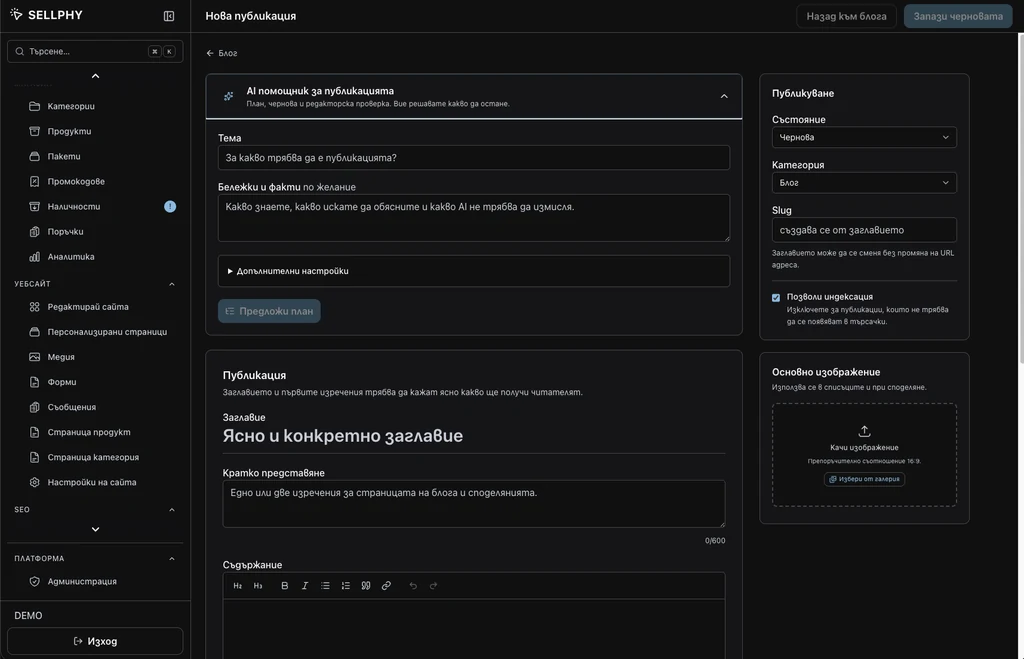
The blog assistant works the same way. The seller gives a topic and a notes-and-facts field for what the AI must not invent, and it proposes a plan, drafts the post and runs an editorial check. The seller decides what stays. Slug, indexing and the featured image sit in the publishing panel on the right, and Page Preview checks the result before it goes out. Custom pages built this way rank about 75% higher on Google than the pages sellers were putting up before, and a week of content fits in an evening.
The field for what the AI must not invent is the design decision I argued for hardest. A shop owner knows the return window and the fabric weight; the model does not, and it will fill the gap with something plausible. Making the seller write the facts down first is a small chore that removes confidently wrong copy before it is written.
Every screen explains itself.
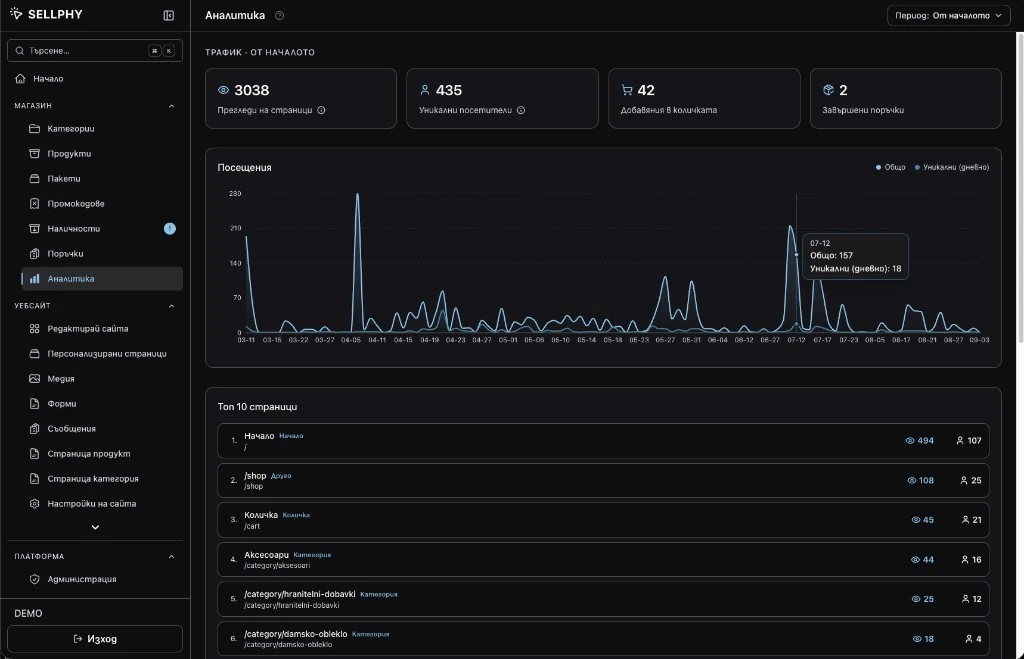
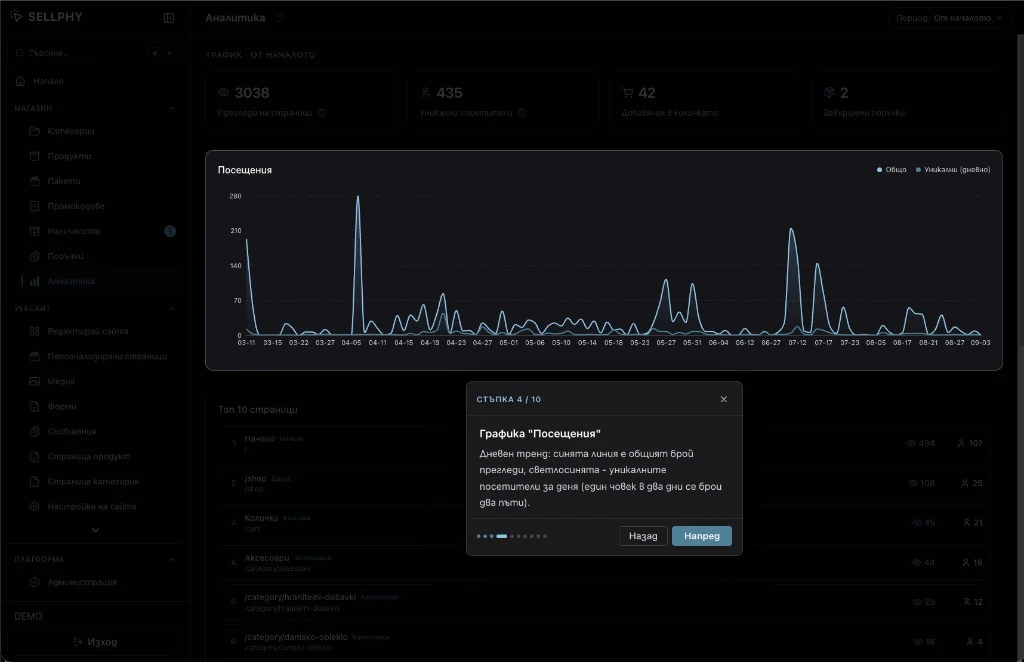
Each main dashboard screen has a guided tour. It starts on the first visit, and the question mark in the header replays it. Completion is stored per shop. There are seventeen tours, covering products, orders, the site editor, SEO, domains and inventory.
The analytics tour is ten steps. Step four, in the capture, explains the visits chart: the dark line is total page views, the light one is unique visitors per day. Because there are no cookies, unique visitors reset at midnight UTC, and someone who comes back every day for a week counts seven times.
That is the price of counting without cookies, and the tour says so in plain words where the seller will read it. A seller who has never run a shop gets through the first week without a support ticket.
Nobody has to learn the menu.
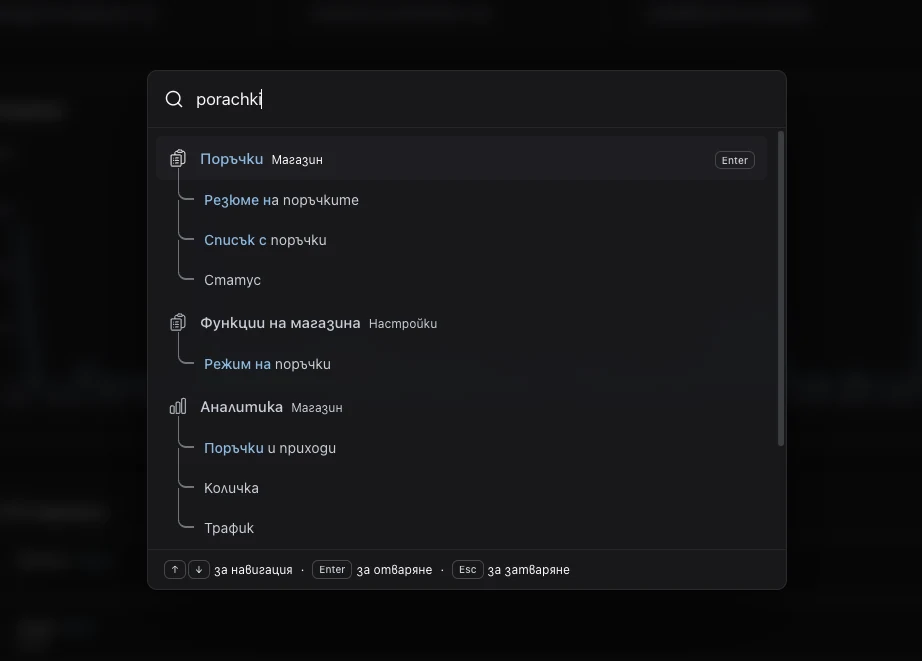
One shortcut opens search from any dashboard screen. A seller types what they are after and gets the exact place it lives: the order mode toggle inside Shop features, the orders and revenue block inside Analytics, the order list itself. Enter opens it. Nobody has to remember which menu a setting is under.
Bulgarian sellers often have the keyboard in Latin mode, so the search reads both alphabets. In the capture the seller typed porachki and the results are for Поръчки, orders, with the matched letters marked. Each hit lists its sub-sections, so the seller lands on the part of the page they wanted rather than the top of it.
I made the same trade everywhere in the dashboard: fewer clicks and less to remember. A tour explains a screen once, and after that search means nobody has to keep a map of the menu in their head. The site editor lets you type into the page instead of finding the field for it. The products table lets you tick rows and edit them together. A seller with a shop to run notices those things before they notice a feature list.
Fast pages, small bill.
A customer opening a Sellphy shop gets a page that was built once and is served as a file. It loads in the time it takes to send it, it does not wait on a database, and a traffic spike from a promotion is the same file going out more times.
The home, shop, category, about, services and legal pages work this way. Cart, checkout and the dashboard stay dynamic. When a seller saves a change, only the affected paths are rebuilt, so an edit shows up in seconds without touching the rest of the shop. Category filters would normally defeat the cache, so a proxy folds the filter into an internal path while the public URL stays readable.
Once the storefronts were files I no longer needed Vercel. The whole platform runs in Docker on a Hetzner VPS behind Caddy, and the hosting bill is 83% lower than before. Moving all of my own shops onto it saves me 25 or more hours of maintenance a month, which is time that now goes into the product.
Next up:
Finance Me.
A family expense tracker that picks up Apple Pay purchases through an iOS Shortcut.